Welcome to Dribble
Dribble is an AI-powered, open source SQL IDE that makes working with databases simple and intuitive. Connect to multiple databases, write queries with AI assistance, and explore your data all in one interface.
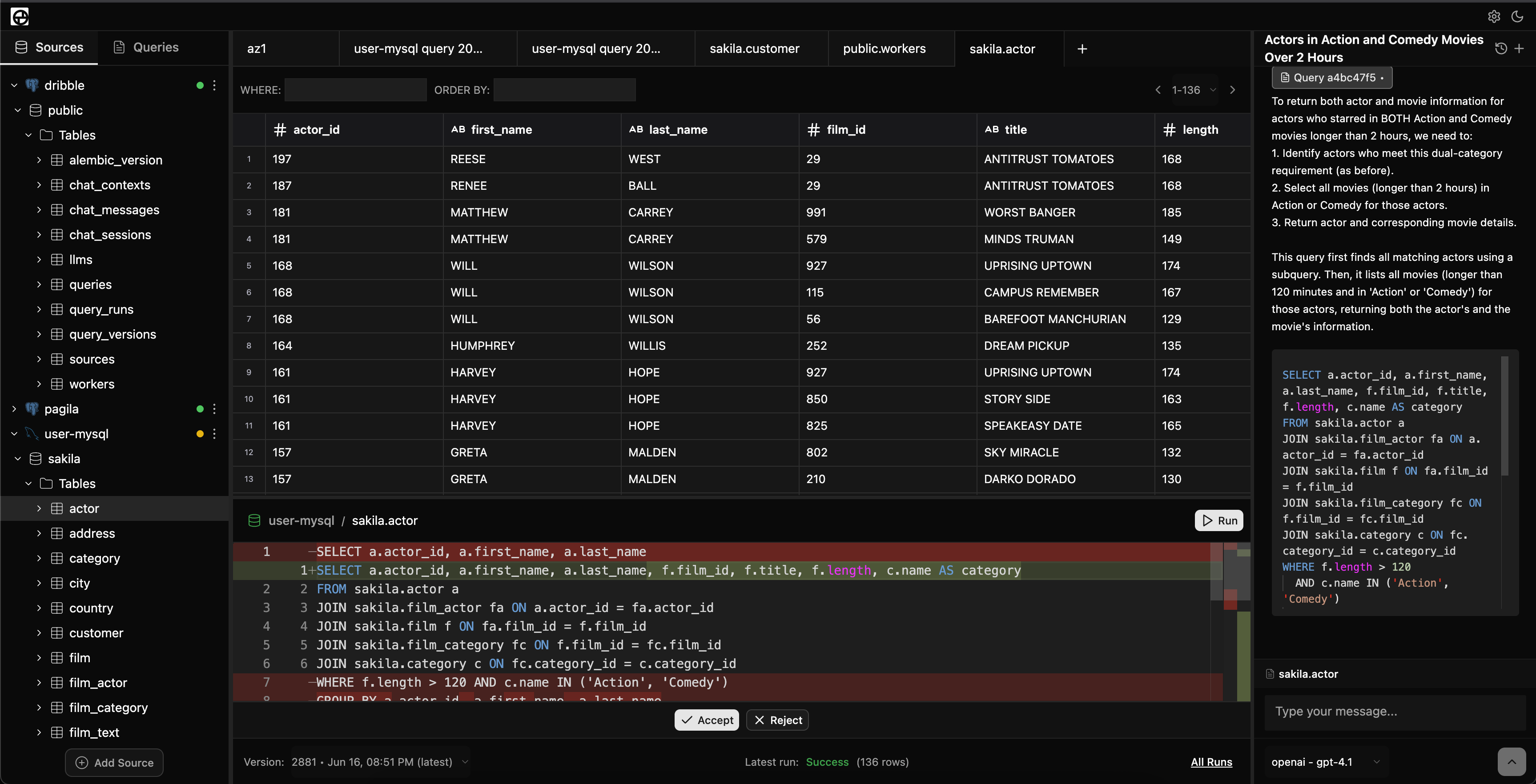
What makes Dribble special?
🔌 Multi-database support - Connect to PostgreSQL and MySQL with isolated workers
🧠 AI-powered assistance - Get context-aware help writing and optimizing SQL queries
📊 Visual data exploration - Browse your database schema in an intuitive file tree
💾 Query management - Save, version, and organize your queries with automatic versioning
⚡ Fast execution - Isolated Docker workers ensure optimal performance and security
🌐 Web-based - Access from anywhere with a modern browser
📝 Advanced SQL editor - Monaco editor with syntax highlighting and intelligent auto-completion
📈 Performance monitoring - Track query execution time, row counts, and performance history
🗂️ Query tabs - Work with multiple queries simultaneously
🔄 Query versioning - Automatic version control for your queries with diff comparison
💬 Context-aware chat - AI assistant that understands your schema and current queries
Core Features
Database Management
- PostgreSQL and MySQL: Full support with isolated worker containers
- SQLite: UI support (worker containers coming soon)
- Isolated workers: Each database connection runs in its own Docker container
- Connection management: Add, edit, test, and manage database connections
- Schema discovery: Automatic detection and display of database structure
Query Development
- Monaco SQL editor: Professional code editor with syntax highlighting
- Auto-completion: Intelligent suggestions for tables, columns, and SQL keywords
- Query tabs: Manage multiple queries simultaneously with a tab interface
- Ephemeral queries: Temporary queries for quick data exploration
- Query execution: Run full queries or selected portions with keyboard shortcuts
Query Management
- Automatic versioning: Every significant change creates a new query version
- Version comparison: See differences between query versions
- Query history: Complete execution history with performance metrics
- Query runs: Track execution time, row counts, success/failure status
- Auto-save: Queries save automatically as you type
Data Visualization
- Spreadsheet-style results: Powered by Glide Data Grid for smooth handling of large datasets
- Interactive table: Sort, filter, and navigate results efficiently
- Export options: Copy data to clipboard or export to CSV
- Resizable panels: Customizable interface layout
AI Assistant
- Context-aware help: AI understands your database schema and current queries
- Natural language to SQL: Describe what you want and get SQL queries
- Query optimization: Suggestions for improving query performance
- Error debugging: Help identifying and fixing SQL issues
- Chat sessions: Persistent conversations with full context
Quick Navigation
For Users:
- Quickstart Guide - Get up and running in minutes
- Key Concepts - Understand how Dribble works
- Using the App - Complete feature walkthrough
For Developers:
- Developer Concepts - Architecture and technical details
Need Help?
- 📚 Browse the documentation sections above
- 💬 Use the built-in AI assistant for SQL help
- 🐛 Report issues on GitHub
Let's get started with the Quickstart Guide!